Inventory Reorder Point Calculator

Calculate your inventory reorder point: lead time demand plus safety stock, then see whether current stock means reorder now.

A deterministic reorder trigger using average demand and explicit safety stock. It does not calculate a probabilistic service level or guarantee against stockouts.

Results will appear here.
Calculation details
Every figure above is calculated locally in your browser from the assumptions shown. No inputs are sent anywhere. See the methodology section below for the formulas used.
Use this resultShare the current inputs, or ask ChatGPT to explain the calculation in context.
Ask an AI to explain this result
Share this result

Planning estimate only. Platform fees, taxes, payment costs, and policies can change; verify current terms before pricing.

This tool runs in your browser. Your calculator inputs and results are never transmitted to us or to ad/affiliate partners. Ads and sponsored links may set third-party cookies to serve and measure them, but they never receive your calculation values. If you explicitly save a scenario, its permitted fields stay in local browser storage until you clear them. See our Privacy Policy.

Use this result

Share the current inputs or ask ChatGPT to explain the calculation in context.

More options
Report a calculation issue
Direct answer

What does this calculator estimate?

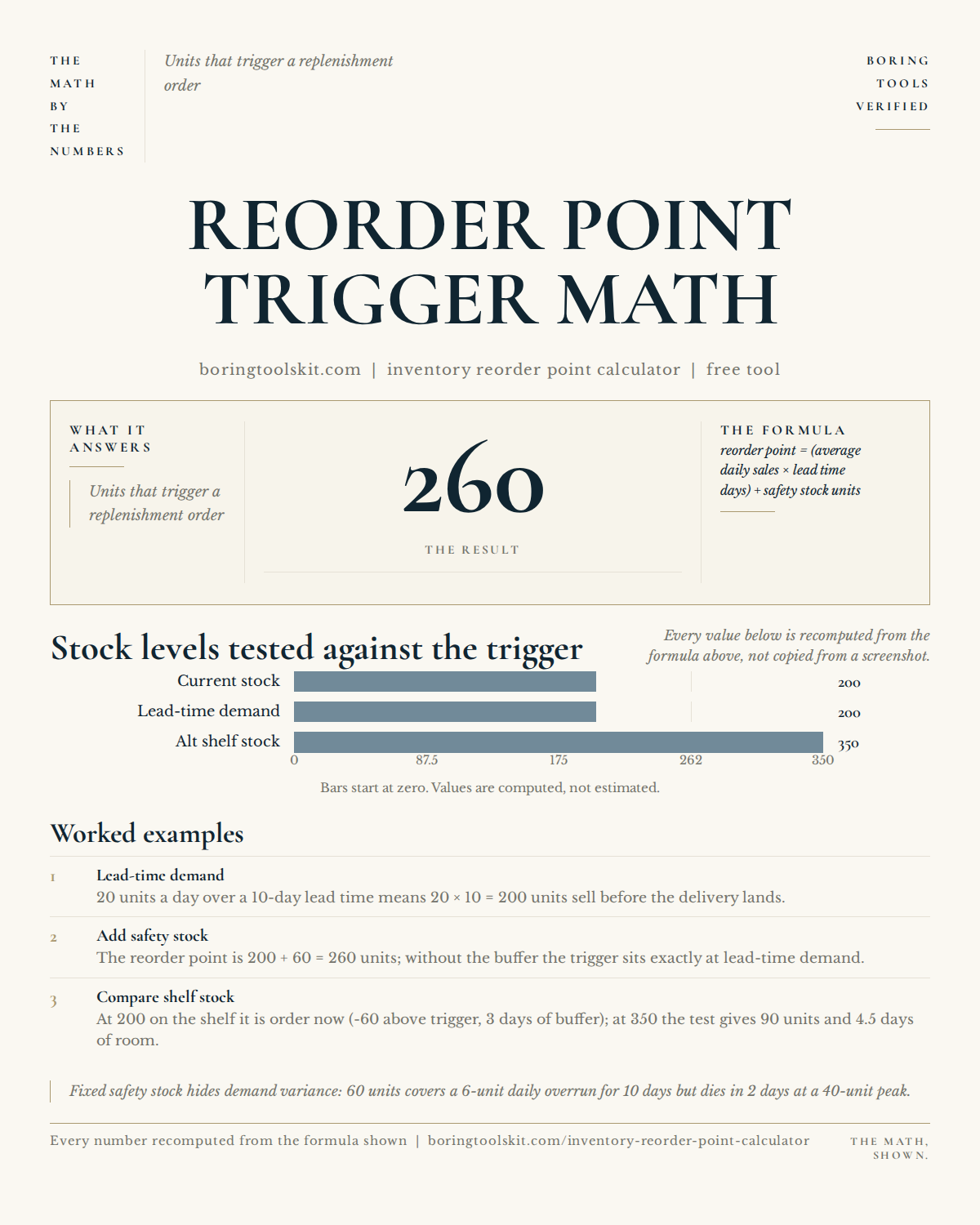
An inventory reorder point calculator tells you when to reorder stock. Enter average daily sales, lead time, safety stock, and current stock to see the reorder point and whether to order now.

  • Reorder point = daily sales × lead time + safety stock
  • Safety stock covers demand spikes and delays
  • Order when stock hits the reorder point

Why reorder points prevent stockouts

Stockouts lose sales and cost trust; overstocking ties up cash. The reorder point balances both: order when remaining stock just covers the lead-time demand plus a safety buffer. It's the classic inventory control trigger.

Limitations to watch for

Average daily sales hides seasonality — reorder points should adjust for peaks. Lead time varies with suppliers. Safety stock is a judgment call based on how much risk you can tolerate.

How to use it in practice

Track your daily sales average and true lead time from order to delivery. Set safety stock to cover your worst realistic week. When the tool says order, order — and review the numbers quarterly.

  • Enter average daily sales and lead time in days.
  • Enter safety stock and current stock on hand.
  • The tool computes the reorder point and flags whether to order now.

What reorder point means

The reorder point is the inventory level that triggers a new order: (daily usage × lead time) + safety stock. A business using 20 units daily with a 10-day lead time and 100 units of safety stock reorders at 300 units.

Lead time is the risk window

Lead time runs from placing the order to receiving it. Longer or more variable lead times require more buffer. If a supplier's lead time is 10 days but sometimes 15, the reorder point must cover the worst case or the shelf goes empty.

Safety stock absorbs variation

Safety stock covers demand spikes and delivery delays. A common rule: (max daily usage − average) × max lead time. The calculator takes your usage and lead-time estimates and adds the safety layer.

A worked example

30 units daily usage, 14-day lead time, 200 units safety stock: reorder point = 420 + 200 = 620 units. If usage rises to 40 daily, the point jumps to 560 + 200 = 760. The calculator recomputes instantly when inputs change.

Beyond the point: order quantity

The reorder point says when; the economic order quantity says how much. Ordering in larger batches cuts order frequency but raises holding costs. The calculator handles the trigger; the EOQ formula sizes the batch.

Transparent methodology

How this calculator works

Reviewed 2026-08-25 · BoringToolsKit Editorial Team

Formula

Reorder point = (average daily sales × lead time in days) + safety stock. Days of stock on hand = current stock ÷ average daily sales. Order now if current stock ≤ reorder point.

Worked example

20 units sold per day, 7-day lead time, 40 units safety stock: reorder point = 20 × 7 + 40 = 180 units.

Assumptions to verify

  • Daily sales and lead time are reasonably stable.
  • Safety stock is set appropriately by the user.
  • No batch-discount or economic-order-quantity optimization is modeled.

Frequently asked questions

What is a reorder point?

The stock level that triggers a purchase order — lead-time demand plus safety stock. 20/day × 7 days + 40 = 180 units.

How do I calculate it?

Average daily sales × lead time in days + safety stock. That's the level at which you place the next order.

What is safety stock?

Extra inventory to cover demand spikes and supplier delays — a buffer sized to your risk tolerance.

What is lead time?

The days between placing an order and receiving it. Longer lead times raise the reorder point.

What if my sales are seasonal?

Use peak-season daily averages for holiday inventory, or recalculate the reorder point each season.

Why does overstocking hurt?

Cash sits in shelves instead of working for you, and stock can go obsolete or expire.

How often should I review it?

Quarterly, or whenever sales or lead times change materially.

How much safety stock should I carry?

Enough to cover max-usage days beyond the average during lead time.

Does the reorder point change?

Yes — as usage, lead time, or safety targets change, recompute the trigger.

Cite this tool

BoringToolsKit. “Inventory Reorder Point Calculator.” boringtoolskit.com/inventory-reorder-point-calculator/ (reviewed 2026-08-25). Free to reference in articles, syllabi, and answer posts with a link.

Privacy: Inputs and results stay in this browser. Any future sponsored recommendation or advertisement will be clearly labeled and kept separate from the calculation.